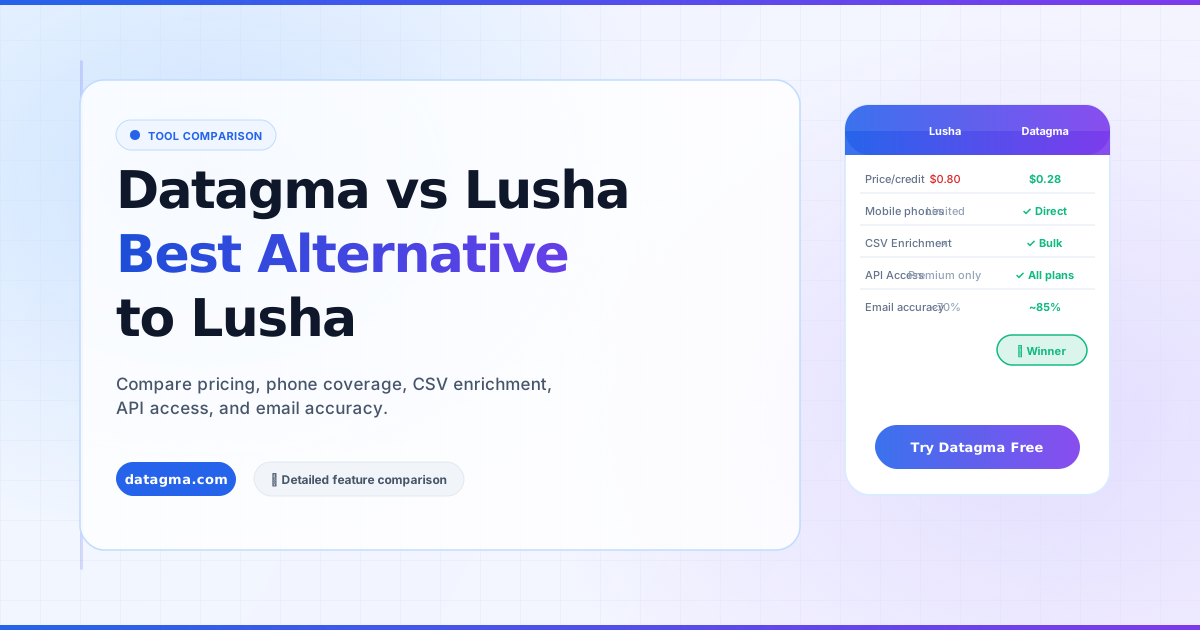
Why Datagma Is the Best Alternative to Lusha
Looking for a Lusha alternative? Compare Datagma vs. Lusha on pricing, phone number coverage, CSV enrichment, API access, and email accuracy.
On this page
Introduction
Are you looking for a Lusha alternative? In this article, we compare the key points between Lusha & Datagma, including pricing, percentage of phone numbers found, features, and email accuracy.
Lusha has built a great product to help companies find phone numbers. If you’re here because you’re evaluating Datagma vs. Lusha or looking for Lusha alternatives, you’re already doing the right thing by finding the tool that will best serve your sales team.
Before engaging, it’s essential to compare the pros and cons of each tool. We are here to help you decide.
What Datagma and Lusha Do
Both platforms let you:
- Find contact information for your ideal customers (email addresses, phone numbers, social profiles) from a search engine
- Use a Chrome Extension to find data while browsing professional social networks
- Use a File Upload / CSV Enrichment feature to enrich thousands of contacts with up-to-date mobile phone numbers
- Use an API to integrate with CRMs, email senders, automation tools, etc.
So if both platforms offer similar features, what’s the difference between Datagma and Lusha?
The Pros of Choosing Datagma as a Lusha Alternative
Datagma Finds More Phone Numbers Than Lusha
We ran a simple test on a sample of 400 professional profiles, drawn at random across two audiences:
- United States, marketing, 51–200 employees, Software Development & Banking (200 people)
- India, finance, 5,000–10,000 employees, Healthcare (200 people)
We then enriched these files with phone numbers via the CSV Enrichment feature in Datagma. For Lusha, which doesn’t offer CSV Enrichment on standard plans, we had to visit each profile manually, a process that took a freelancer 12 hours.
Result: Datagma found significantly more mobile phone numbers per file than Lusha, especially on the Indian sample.
If you are looking for mobile phone numbers at scale, Datagma is the better choice.
Datagma Finds Mobile Phone Numbers by CSV Enrichment
With Datagma, you can upload CSV or Excel files to find up to 50,000 mobile phone numbers in minutes. With Lusha, you have to visit each profile individually, a painfully slow way to prospect.
This feature alone saves hours every week for outbound sales teams.
CSV Enrichment exists on Lusha, but only on their enterprise plan starting at $7,000/year. With Datagma it is included from $49/month.
The File Upload feature also allows you to:
- Find all employees in up to 1,000 companies at once
- Track job change detection for up to 1,000 contacts
Extensive API and Integrations with Datagma
Datagma offers an open API and ready-made integrations with Zapier, Make, N8N, Captain Data, Clay, Surfe (Leadjet), and more.
Lusha also has an API, but only from $7,000/year. With Datagma, API access is included in all plans from $39/month.
Another critical difference: Lusha’s API returns HQ phone numbers, while Datagma returns only mobile phone numbers, far more valuable for direct outreach.
Lower Pricing for Phone Credits
Lusha charges between $0.75 and $0.98 per credit depending on the plan. Datagma works out between $0.28 and $0.49 per phone, depending on plan and billing period.
That’s roughly half the price per phone number, and up to a third on the Expert plan billed annually.
Moreover, with Datagma:
- You only pay when we find a mobile phone number
- Landline numbers are free
- No add-on pricing, all integrations, email verification, and API are included from the lowest plan
Thousands of Verified Emails Included
Lusha charges one credit per email or phone number (~$0.86 on their cheapest plan). Datagma’s smallest paid plan includes 36,000 verified work emails a year, around 3,000 a month.
On the Popular plan at $99/month you get 90,000 a year, roughly 7,500 a month, all validated via NeverBounce before delivery.
HubSpot Automatic Enrichment & Job Change Detection
Datagma creates or completes contacts and companies in HubSpot, Salesforce and Pipedrive. Whenever a contact is created, Datagma writes more than 70 properties, company info, funding, technologies, headcount and more.
When one of your contacts changes company, Datagma detects the change in real time and alerts you. This “warm” outreach converts far better than cold outreach.
Job Change Detection in your CRM is available in Datagma but not in Lusha.
Possibility to Pause Your Datagma Account
Both Lusha and Datagma offer credit rollovers on monthly plans. But when you cancel Lusha, you lose all unused credits.
With Datagma, you can pause your account at any time and keep your credits until you reactivate. Nothing gets wasted.
Pros of Using Lusha over Datagma
Lusha Offers More Search Filters
Datagma does not maintain a static database, every request is made in real time by crawling publicly accessible sources. This ensures fresh data, but limits search filters to: Full Name, Company, Role, and Location.
If you need more advanced filters (technology used, company size, revenue), you will not find them natively in Datagma. The workaround: use a professional network as your search engine and export to Datagma for enrichment.
Lusha Extension Has Broader Coverage
The Lusha Extension works on recruiter platforms, while the Datagma Chrome Extension currently supports only regular profiles and Sales Navigator profiles.
Lusha also offers “Lusha Everywhere”, revealing employee data while browsing any website, not just professional networks. This feature is not yet available in Datagma.
Conclusion
While Datagma is significantly cheaper than Lusha, it is faster and more accurate for finding mobile phone numbers at scale, enriching bulk data via CSV, and integrating with your CRM and automation stack.
Datagma pricing starts at $39/month billed annually, $49 monthly, compared to Lusha’s enterprise plans starting at $7,000/year for equivalent API and CSV features.
If you’re an enterprise team, Datagma scales easily to 100,000+ email addresses and 50,000+ phone number searches per month.